

New Guide Outlines a Practical Approach to Static-to-Video Workflows
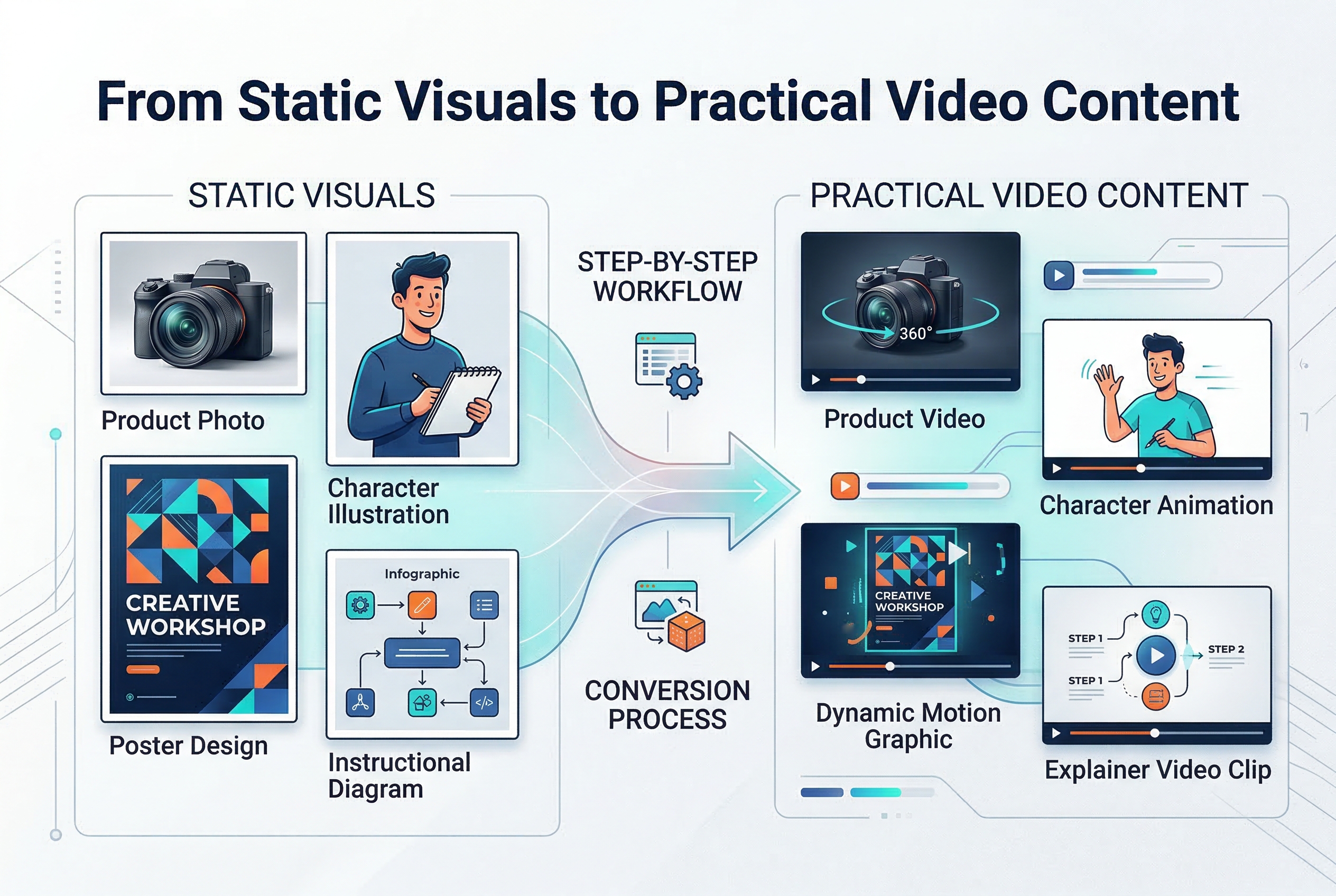
From static visuals to practical video content
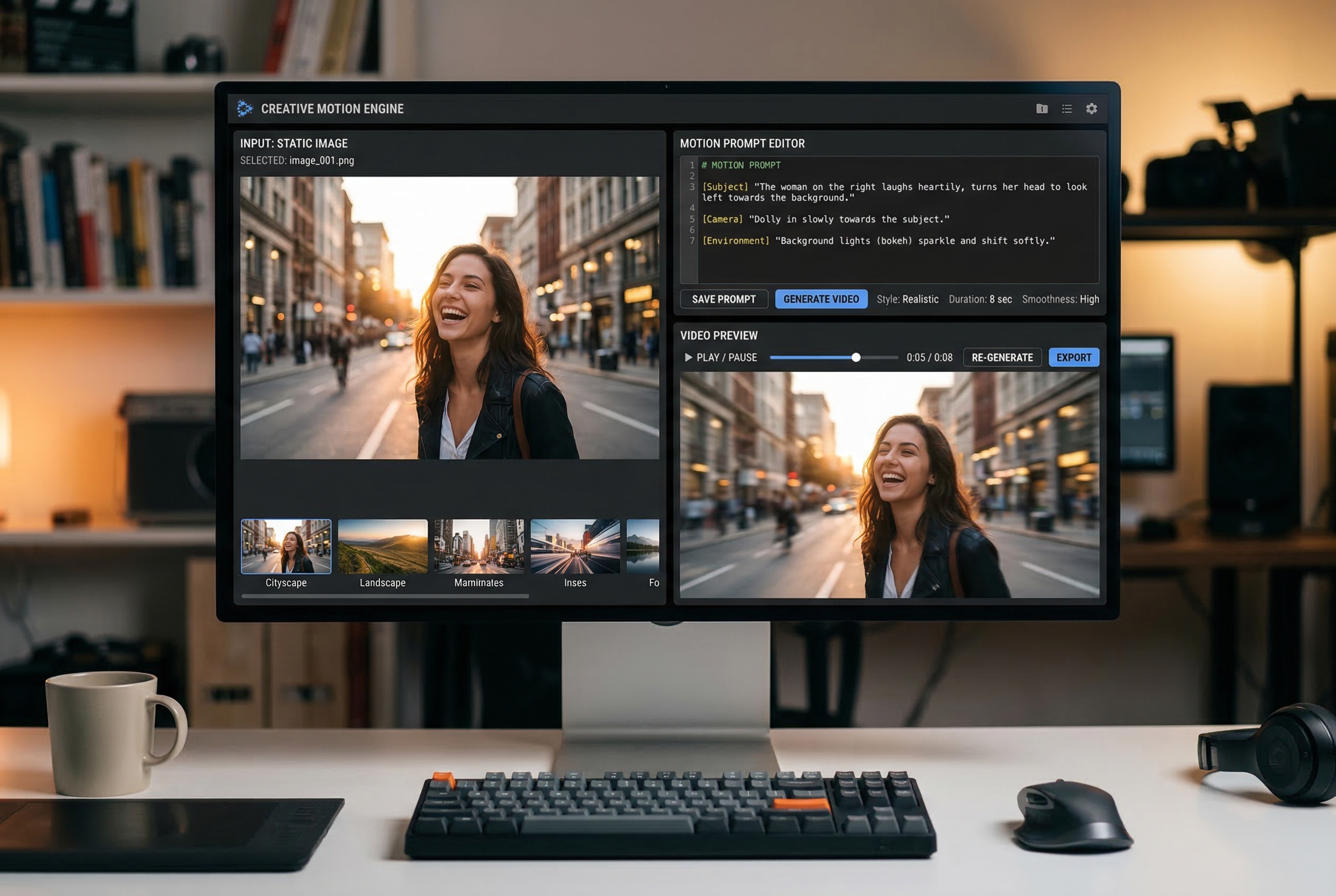
Choose the right still image and write a motion prompt
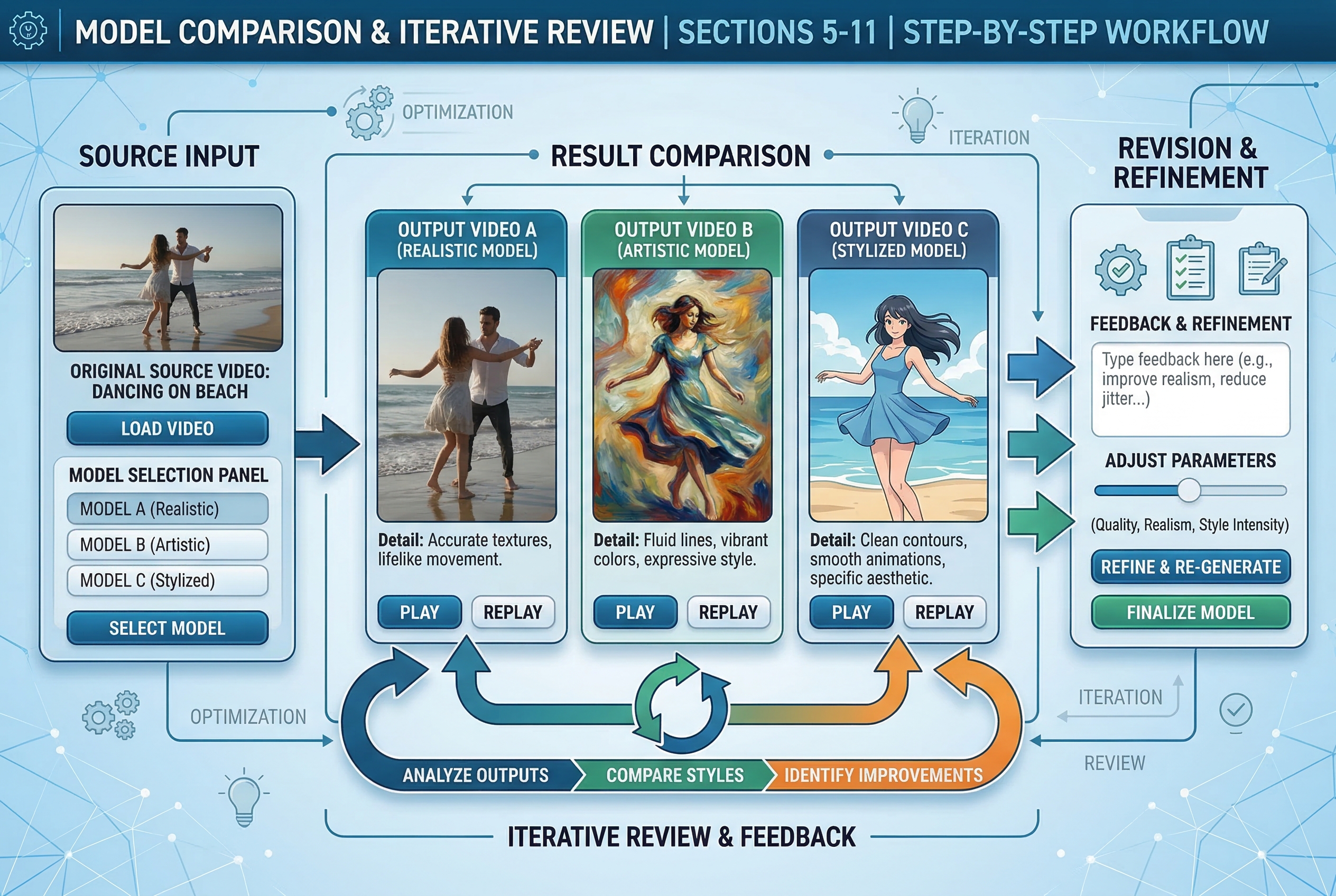
Model comparison and iterative review
The guide covers image preparation, motion prompting, model selection, and iteration for more usable static-to-video results.
SHERIDAN, WY, UNITED STATES, April 13, 2026 /EINPresswire.com/ -- Artificial intelligence video creation is becoming more useful when it fits everyday creative work. Many people no longer approach these tools just to test a novelty clip. They use them to turn existing visuals into short-form content, concept drafts, campaign assets, and lightweight motion pieces that are easier to make than a full production.A common starting point is not a blank prompt. It is an image that already exists. That image might be a product photo, a poster, a character illustration, a branded visual, a storyboard frame, or a marketing asset that already has the right look. From there, the goal is usually simple: add motion, keep the visual direction, and create something usable for publishing, testing, or review.
This guide explains how to build a more practical workflow around still visuals, what to prepare before generating motion, how model selection affects output, and how to use tools such as AI image to video, Wan AI video generator, and Wan 2.2 in a more controlled way.
1. Start With a Clear Goal Before You Generate Anything
The most common mistake in AI video creation is starting too early. People upload an image, type a loose prompt, and hope the motion will somehow match their intention. Sometimes it works, but often the result feels random, overdone, or disconnected from the original asset.
A better approach is to define the actual purpose of the video first.
Ask a few simple questions:
What is this clip for?
Is it for social media, a teaser, a product post, a concept test, an ad draft, or a visual experiment?
What should stay consistent?
This may include character identity, product shape, composition, color mood, wardrobe, branding, or a specific subject pose.
What kind of movement is needed?
Not every image needs dramatic camera motion. Sometimes a subtle push-in, head turn, fabric movement, or environmental animation is enough.
What matters more here: speed or control?
Some projects are quick tests. Others need more careful iteration. Knowing that in advance helps you choose a better workflow.
This first step sounds obvious, but it changes the quality of the entire process. When the goal is clear, the generation becomes easier to guide and easier to evaluate.
2. Choose the Right Kind of Starting Image
Still-image-led workflows work best when the source visual already has a strong foundation. A weak image usually produces unstable motion. A clear image gives the system more structure to build from.
A useful source image often has these qualities:
A clearly defined subject
The main person, product, object, or scene should be easy to identify.
Readable composition
Crowded visuals with too many competing elements are harder to animate cleanly.
Consistent lighting
Images with a stable light source usually translate better into motion.
A strong focal point
The model should know what deserves attention.
Usable detail
Textures, edges, clothing, background separation, and facial structure all help.
This does not mean the image has to be perfect. It just needs enough clarity to support motion. If the image is too noisy, too compressed, badly cropped, or visually confused, it is often worth fixing the still frame first before trying to animate it.
In real production work, that is often the smarter move. Good video generation usually begins with better input preparation, not better luck.
3. Decide Whether You Need Prompt-Led Motion or Image-Led Motion
Not every project needs the same workflow. Some video ideas begin with language. Others begin with an approved visual asset.
Prompt-led workflows are useful when:
the concept is still open
you want to test multiple directions quickly
no final visual exists yet
you are exploring mood, style, or scene concepts
Image-led workflows are useful when:
you already have a strong still image
brand direction needs to stay recognizable
character identity matters
product structure needs to remain close to the source
the goal is motion extension rather than total reinvention
In many everyday cases, image-led motion is the more practical choice. It reduces ambiguity and makes the output easier to compare against the original visual. That is one reason tools built around AI image to video have become more important in content workflows. They match the way many teams already work: start from an approved image, then extend it into motion.
4. Write Motion Instructions, Not Just Style Prompts
A lot of weak outputs come from prompts that only describe how the image should look, not how it should move.
For example, a prompt like this is often too vague:
“cinematic, beautiful lighting, highly detailed, dramatic atmosphere”
That may influence style, but it does not clearly describe motion behavior.
A more useful prompt often includes:
subject movement
camera movement
environmental movement
emotional tone
pacing
what should remain unchanged
For example:
“Slow camera push-in. The subject keeps the same face and outfit. Hair moves slightly in the wind. Background lights flicker softly. Expression remains calm. Motion should feel subtle and natural.”
That kind of instruction is more practical because it gives the system something to do. In many cases, the best AI video prompt is not the most poetic one. It is the clearest one.
A strong motion prompt usually answers these questions:
Who or what moves?
How much do they move?
Does the camera move too?
What stays stable?
Should the result feel soft, energetic, dramatic, calm, or realistic?
When working from a still visual, motion clarity matters more than decorative adjectives.
5. Use Model Choice as a Workflow Decision
Model selection matters more than many beginners expect. Different systems can respond differently to the same image and the same prompt. Some feel better for stylized content. Some feel better for practical motion extension. Some are chosen because users want to test a specific route that is already popular in the market.
That is why model awareness has become part of normal workflow planning. Instead of treating the entire process as one black box, it helps to think in terms of options.
The point is not to become overly technical. The point is to understand that different tools may interpret motion, consistency, or visual structure differently.
This is also why interest around the Wan AI video generator category continues to grow. Many users want a workflow where model choice is part of the creative process, not hidden behind a single default setting.
A practical way to handle model selection is to ask:
Is this a stylized clip or a realistic one?
Do I need identity consistency?
Is the goal a fast concept draft or a more refined motion result?
Am I exploring or producing?
Treating model choice as a workflow decision usually leads to better results than picking one route and repeating it blindly.
6. When to Try the Wan 2.2 Video Model
If you are comparing options, it can be useful to test a named route such as the Wan 2.2 video model inside a structured workflow.
A named model is helpful for three reasons.
First, it gives you a clear testing reference. Instead of saying “this tool felt better,” you can compare outputs more concretely.
Second, it helps teams discuss results more clearly. If more than one person is reviewing content, naming the route used makes feedback more organized.
Third, it improves repeatability. If one version works well for a certain kind of asset, you can build a more stable internal process around it.
That does not mean one model is always best. It means named model access helps turn random experimentation into something more trackable.
A practical test method is simple:
use the same source image
keep the prompt mostly stable
run two or three model options
compare motion behavior, identity stability, and overall usefulness
choose based on the project goal, not just novelty
This kind of side-by-side testing is often what separates a repeatable workflow from casual experimentation.
7. Build Around Real Use Cases, Not Abstract Possibilities
AI video becomes much easier to use when the task is concrete.
Here are a few examples of realistic use cases:
Turn a product image into a short promotional clip
This works well for lightweight ads, marketplace posts, and launch teasers.
Animate character art into a teaser
Useful for creators working with anime, games, web stories, or visual branding.
Create a motion draft from a campaign poster
This helps marketing teams test how a static concept may feel in motion.
Make educational visuals more engaging
A still diagram or explanatory visual can become more dynamic and easier to present.
Test movement before larger production
Sometimes the goal is not final delivery. It is early direction testing.
The more specific the use case, the easier it is to judge whether the output is useful. Vague goals create vague reviews. Clear goals create usable workflows.
8. Keep the First Output Small and Reviewable
Another common mistake is trying to generate the “final version” too early. In most cases, the first output should be treated as a draft.
That first draft should help you answer:
Is the motion direction right?
Is the camera doing too much?
Does the subject still feel like the original image?
Is the result usable enough to refine?
Does the output match the content goal?
This mindset helps a lot. It prevents unnecessary disappointment and encourages iteration.
A practical workflow often looks like this:
(1) prepare the still image
(2) define the use case
(3) write a motion-focused prompt
(4) generate a short first pass
(5) review stability and direction
(6) adjust prompt or model
(7) generate a stronger second pass
This is much closer to real creative work. Most usable content does not appear fully solved on the first try. It improves through controlled iteration.
9. Preserve What Makes the Original Asset Useful
One reason image-led motion has become more valuable is that many users do not want to replace their existing visual direction. They want to preserve it while adding movement.
That means you should decide what absolutely needs to stay intact.
This may include:
facial identity
product shape
composition
costume
logo placement
color palette
key background structure
mood
If the system changes too much, the result may be visually interesting but practically useless.
This is especially important for brand content. A campaign asset usually already passed review for a reason. A product image may already be approved for shape, framing, and messaging. A character illustration may already define identity. In those cases, motion should extend value, not erase structure.
A useful rule is this: preserve first, stylize second.
10. Write for Searchability and Human Clarity at the Same Time
If the article, workflow note, or supporting page around your video process is meant to be indexed, clarity matters. Search engines and AI retrieval systems respond better to direct, descriptive language than to inflated marketing phrases.
That means it helps to write plainly:
what the tool does
what the workflow starts from
what kind of outputs users can create
what use cases it supports
why one model route may be chosen over another
That kind of writing is also more useful for teams. It becomes easier to explain the workflow internally, easier to document what worked, and easier to teach other people how to repeat the process.
In practical terms, strong workflow writing is often:
specific
neutral
experience-based
easy to verify
built around actual tasks
That makes it more aligned with EEAT principles and more useful for long-term indexing.
11. A Simple Practical Workflow to Follow
If you want a clean starting process, this is a practical sequence:
Choose one strong still image.
Pick a visual with a clear subject and composition.
Define the clip purpose.
Know whether you are making a teaser, ad draft, social post, or concept test.
Decide what must stay stable.
Protect identity, structure, framing, and visual direction.
Write a motion-first prompt.
Describe movement clearly instead of relying only on style words.
Test one or two model routes.
Do not assume one default option fits every project.
Review the first result like a draft.
Check whether the motion supports the task.
Refine based on use, not novelty.
Choose the version that is most useful, not the one that is merely most surprising.
This kind of process makes AI video feel much less random. It turns generation into something closer to a working method.
12. Final Thoughts
AI video becomes more practical when it helps people do familiar creative work with less friction. For many users, the most useful path is not starting from nothing. It is starting from a still visual that already carries the right direction, then extending that asset into motion with a clearer workflow.
That is why image-led creation keeps gaining attention. It matches how creators, marketers, educators, and design teams already work. It also explains why model choice is becoming more important. As workflows mature, users want to compare options more clearly, document what works, and repeat good results more reliably.
A good process does not need to feel overly technical. It just needs to be structured. Start with a clear image, define the purpose, describe motion precisely, test model options carefully, and review outputs as working drafts. Once that becomes a habit, AI video stops feeling like a one-time trick and starts becoming a usable part of everyday production.
Irwin
MewX LLC
+1 307-533-7137
email us here
Visit us on social media:
LinkedIn
YouTube
X
Legal Disclaimer:
EIN Presswire provides this news content "as is" without warranty of any kind. We do not accept any responsibility or liability for the accuracy, content, images, videos, licenses, completeness, legality, or reliability of the information contained in this article. If you have any complaints or copyright issues related to this article, kindly contact the author above.
